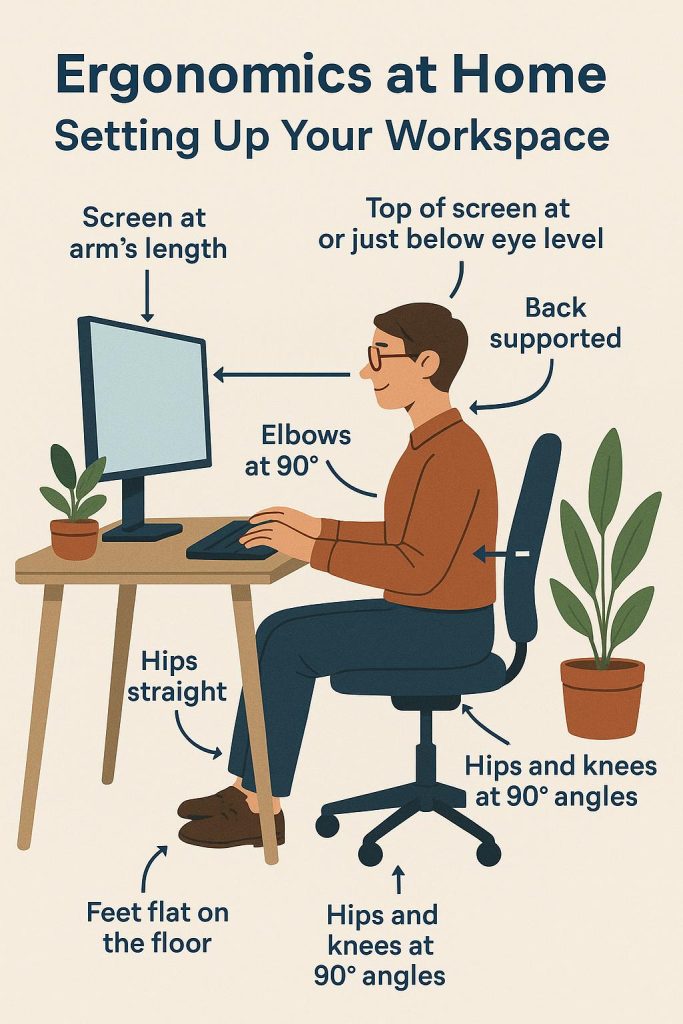
In today’s remote work culture, setting up an ergonomic home workspace is essential to reduce strain and discomfort, especially for those spending long hours at a desk. Poor posture and improper equipment setup can lead to chronic pain, fatigue, and even long-term musculoskeletal problems. To avoid these issues and improve your overall comfort and productivity, it’s crucial to apply ergonomic principles when designing your home office.
- Chair Selection and Posture
The foundation of a good ergonomic setup starts with a proper chair. Opt for a chair that offers adequate lumbar support, supporting the natural curve of your spine. Your feet should be flat on the floor, with your knees at a 90-degree angle. Make sure your back is supported and sits against the backrest, allowing you to maintain an upright posture. Adjust your chair’s height so your hips align with your knees. - Desk Height and Arm Position
When setting up your desk, ensure that the height allows your elbows to be at a 90-degree angle while typing. This minimizes strain on your shoulders, wrists, and forearms. If your desk is too high or low, it can lead to discomfort in the upper body. For added comfort, position your keyboard and mouse at the same level, within easy reach. - Monitor Placement
Your monitor should be placed at arm’s length, directly in front of you, with the top of the screen at or just below eye level. This reduces the strain on your neck and eyes. Ensure your monitor is free from glare by positioning it away from direct light sources, such as windows or overhead lights. If you use multiple screens, place them side-by-side to avoid unnecessary twisting of your neck. - Lighting and Ambience
Good lighting is essential for reducing eye strain. Aim for a combination of natural light and adjustable task lighting that doesn’t create glare on your screen. Soft, warm lighting can create a calming atmosphere, reducing mental fatigue. Avoid harsh fluorescent lighting, which can lead to headaches and discomfort. - Take Breaks and Move Regularly
Even the best ergonomic setup cannot replace the need for regular movement. Set reminders to take short breaks every 30 minutes. Stand up, stretch, or walk around for a few minutes to relieve muscle tension and improve circulation.
By applying these ergonomic principles at home, you can create a comfortable and productive workspace that helps minimize discomfort and promotes long-term well-being. Adjusting your setup to prioritize posture and comfort is an investment in both your physical health and work efficiency.